 Total Print Hub
 Shopify app
The product customizer and gang sheet builder for Shopify.
Total Print Hub is a Shopify app for print shops. It adds a product customizer and a gang sheet builder to the product pages of your own theme, sends every design through Shopify checkout and turns each paid order into a production job with its print files.
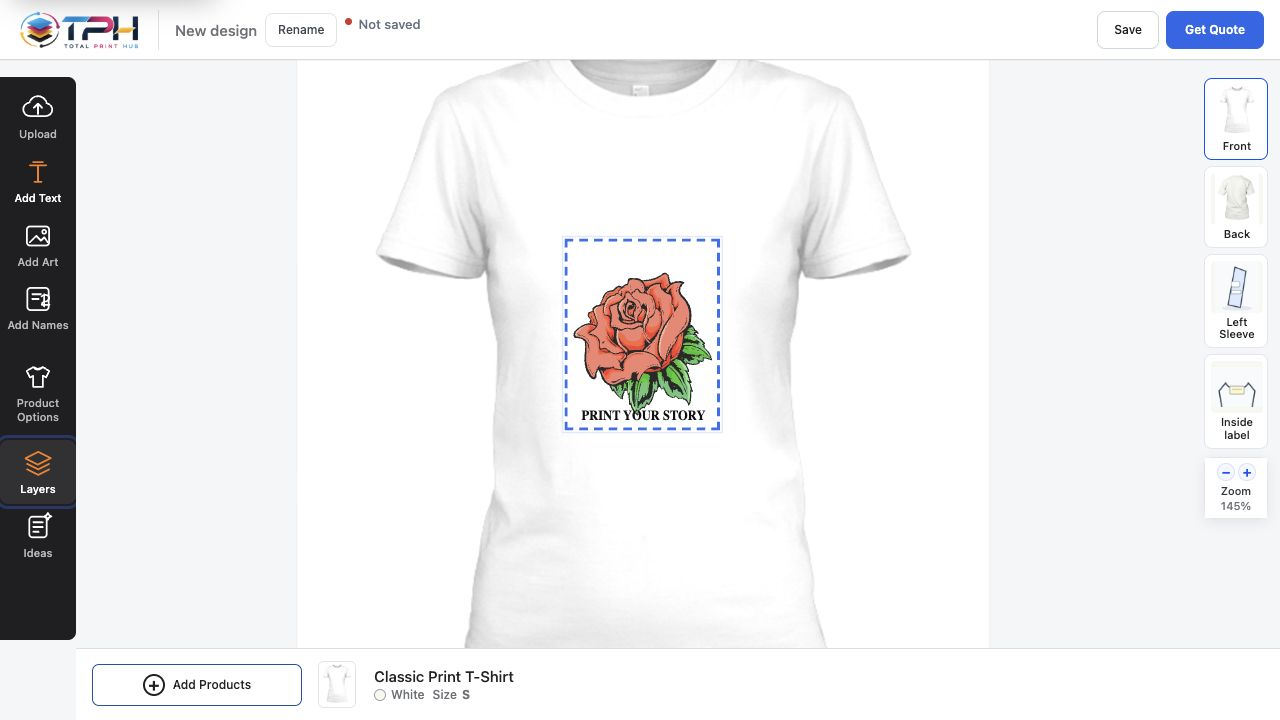
What your customers see on Shopify.
Customers design on the product page they already found. The design button sits in your theme, the finished product goes into the Shopify cart, and your checkout, payments and customer accounts stay exactly as they are. On a phone, customers get the same designer with touch controls sized for fingers.
Design Studio
An online product designer on your product pages: customers add text, upload art and see the design on the product, front and back, on desktop and phone.
Gang Sheet Builder
A DTF and UV DTF gang sheet builder: customers pick one of your sheet sizes, upload designs, set quantities and let auto-arrange pack the sheet.
Instant Merch and Branded Stores
One logo upload shows every product that can print it, and each school, team or company you serve can have its own store.
From the App Store to your first order in five steps.
No code and no theme files to edit. The whole setup happens in Shopify and in the Admin, which opens inside Shopify.
- Install the appOpen the Total Print Hub listing on the Shopify App Store and approve the permissions Shopify shows.
- Choose your planApprove Core, Complete or Dedicated on Shopify's billing screen. The 14-day free trial starts there.
- Follow the launch guideThe Admin opens inside Shopify with a launch guide on Home: set up products, print areas and pricing, or choose Finish later and come back.
- Add the design buttonIn the theme editor, add the Total Print Hub or Instant Merch block to your product template, or turn on the app embed so Add to cart opens the designer.
- Take a test orderDesign a product, check the price in the cart, pay, and watch the order arrive on the production board with its print file.
Shopify keeps your store. Total Print Hub runs the print work.
Total Print Hub adds the design, pricing and production layer. It does not replace your storefront or move your customers anywhere else, and your products, orders and customer records always stay in Shopify, whatever plan you are on or if you uninstall the app.
Stays in Shopify
- Your theme and product pages
- Shopify cart, checkout and payments
- Customer accounts and order emails
- Products, variants and inventory
- Shipping, taxes and discounts
Runs in Total Print Hub
- Design Studio, gang sheets and Instant Merch
- Print prices from your pricing setups
- Saved designs and customer uploads
- Print-ready files at true size
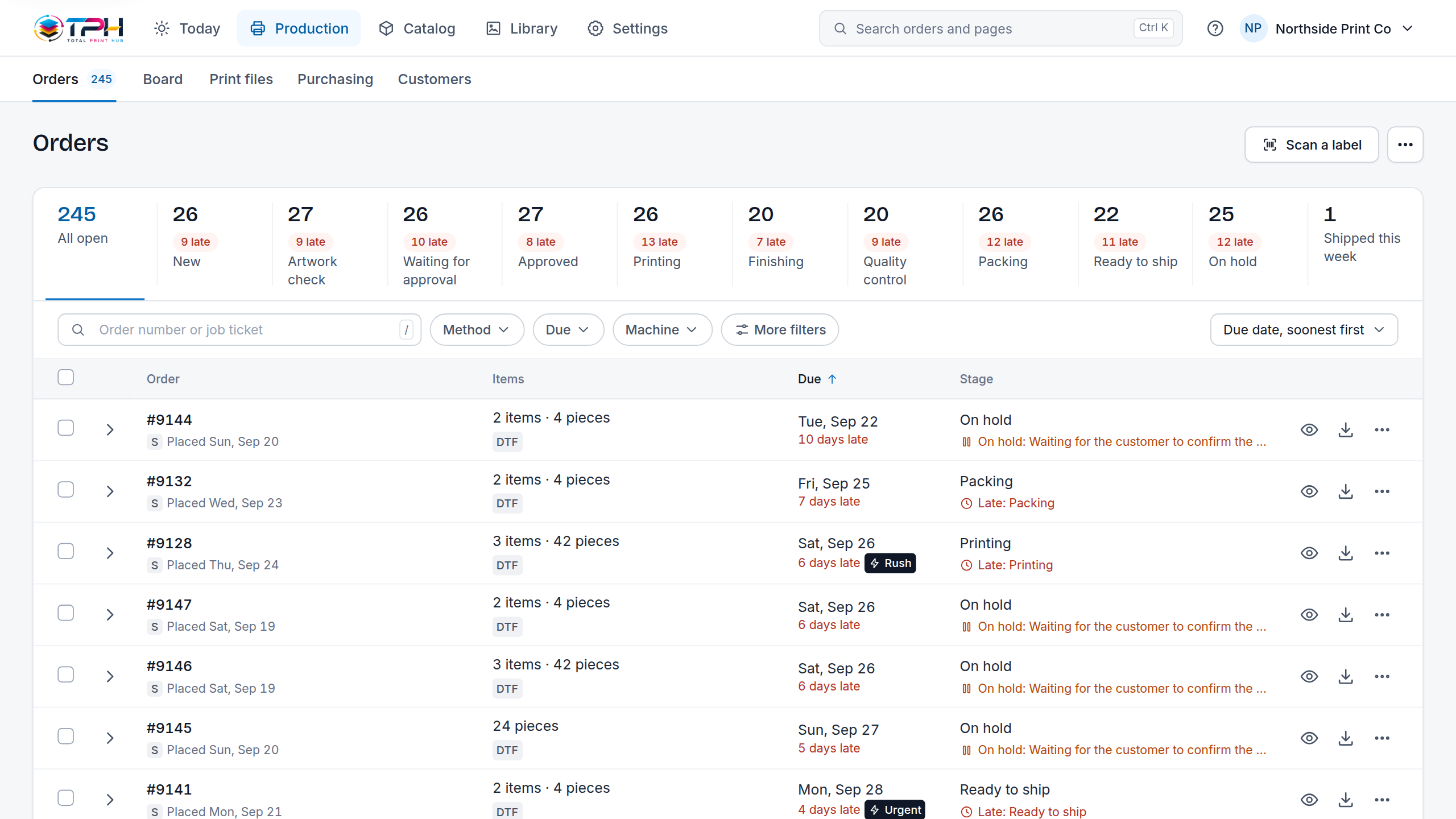
- Production board, proofs and job tickets
Built into the Shopify order flow.
The app reads the orders your store takes and hands production everything it needs. Nobody re-enters an order or rebuilds a file.
- Designs are normal cart linesEach designed product is added to the Shopify cart at the price your pricing setups give, with its design attached.
- Checkout can wait for a ready productAn option on the design block stops checkout while a printable product is not ready to be made.
- Paid orders become jobsEvery paid Shopify order with a design becomes jobs on your production board, with the customer's preview next to the print file.
- The Admin lives inside ShopifyOrders, production, pricing setups and products open in the Shopify admin, next to the rest of your store.
- Your print pricesPrice by print area, print size, color count or stitches. One pricing setup covers every product that uses it, and the cart charges what the designer showed.
- Artwork checked before checkoutEvery upload's resolution is checked at the size it will print, and customers can remove a background, upscale or crop it before they buy.
Billed by Shopify, like your other apps.
Your plan is billed by Shopify on your Shopify invoice, with the 14-day trial first. The prices are the same fixed USD prices as on WooCommerce, with no per-order fees.
Shopify questions
Does Total Print Hub work with my Shopify theme?
Yes. You add the Total Print Hub or Instant Merch block to your product template in the theme editor, or turn on the app embed so Add to cart opens the designer. No theme code is edited.
Is it a product customizer and a gang sheet builder for Shopify?
Both. The Design Studio lets customers personalize a product and the Gang Sheet Builder lets them build DTF and UV DTF sheets. Core includes one of them, Complete and Dedicated include both plus Instant Merch.
Do customers leave my Shopify store to design?
No. The designer opens from your product page, and the finished product goes into your Shopify cart and checkout as a normal line with its price and design.
How is the Shopify plan billed?
By Shopify, on your Shopify invoice. You approve the plan on Shopify's billing screen when you install, and the free trial lasts 14 days or 10 production orders, whichever comes first. There are no per-order fees.
What happens when a Shopify order is paid?
It becomes jobs on your production board with the customer's preview and a print-ready file per print area, generated from the saved design. Nobody re-enters the order.
Does the Admin open inside Shopify?
Yes. The Total Print Hub Admin opens in the Shopify admin, with a launch guide on Home that walks you through products, print areas, pricing and the theme block.
Can I sell on Shopify and WooCommerce at the same prices?
Yes. The plans, features and prices are the same on both platforms. Only the billing differs: Shopify bills your Shopify invoice, WooCommerce stores pay through Stripe.
Put a designer on your Shopify product pages.
Install from the Shopify App Store and start the 14-day free trial on your own products.